Introduction
HR teams today juggle an average of 6-8 separate software applications, leading to manual data re-entry, costly errors, and constant app-switching. Those consequences are tangible: delayed onboarding, payroll mismatches, compliance gaps, and recruiter burnout.
According to Sapient Insights, the average number of HR systems per organization has grown from 10 to 16 in just one year — a fragmented landscape that now consumes 57% of HR professionals' time on administrative tasks rather than strategic work.
This guide explains how HRIS integrations and automations solve this by creating a connected ecosystem where data flows automatically and actions in one system trigger workflows in another. Here's what we'll cover:
- Most valuable use cases for HRIS integration
- Integration methods (native, API, iPaaS, and more)
- Key benefits and measurable outcomes
- Common implementation challenges and how to avoid them
- Selection criteria for building a reliable HR technology stack
Key Takeaways
- HRIS integration connects your HR system with other business tools to enable automated data exchange and synchronized workflows
- Highest-impact use cases: recruiting automation, payroll sync, and onboarding/offboarding workflows
- Integration methods range from custom APIs and unified APIs to native integrations and iPaaS platforms
- Done right, HRIS integrations cut data errors by up to 90% and can accelerate time-to-hire by 70%
- Growing companies should prioritize integrations that automate high-volume, error-prone tasks first—especially recruiting and payroll
What Is HRIS Integration (and Why Does Automation Matter)?
Most HR teams have no shortage of software — the problem is that those systems don't talk to each other. HRIS integration connects a Human Resource Information System with other applications to enable automated data exchange and workflow synchronization. When it works, a single status change in one system sets off a chain of actions across all the others.
For example, when a candidate's status changes to "Hired" in your ATS, an integrated system automatically creates the employee record in your HRIS, provisions software access, and triggers onboarding workflows — without anyone lifting a finger.
Integration vs. Automation
Integration is the connection layer between systems. Automation is the logic that acts on that connection. When an employee's status changes to "terminated," integrated systems automatically:
- Revoke software access across all platforms
- Pause payroll processing
- Trigger offboarding task lists
- Notify IT and department managers
- Archive employee records according to compliance rules
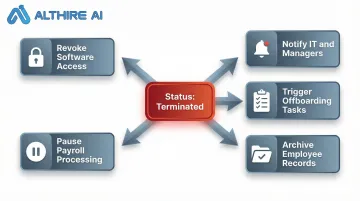
No manual steps required.
Two Primary Integration Categories
Internal integrations connect your HRIS with internal tools like ERP systems, finance software, or Slack. These streamline operations within your organization.
External integrations connect with outside systems — ATS platforms, benefits carriers, government compliance portals, or background check providers. These extend your HR capabilities beyond your organization's walls.
The Business Case for Integration
Gartner found that fewer than 24% of HR functions derive maximum value from their tech stack — despite heavy investment in HR technology. Integration is the primary lever for closing that gap. When systems don't communicate, data sits in silos, manual re-entry creates errors, and HR teams burn hours on administrative work instead of strategic priorities.
The Most Valuable HRIS Integration Use Cases
Payroll Integration
HRIS-to-payroll integration automates tax calculations, deductions, direct deposits, and compliance reporting. For companies where the HRIS lacks a payroll module, this is the single most critical integration.
The automation eliminates double entry: new hire data entered once in the HRIS flows directly to payroll without re-entry. According to a 2022 EY study, the average payroll accuracy rate is just 80.15%, with each error costing $291 to rectify. Integration can reduce these errors by up to 90%, according to vendor-commissioned Forrester studies.
Benefits include:
- Automatic tax withholding calculations based on employee location and status
- Real-time updates when employees change addresses, dependents, or direct deposit information
- Elimination of manual timesheet transfers from time-tracking systems
- Automated compliance reporting for federal, state, and local requirements
Talent Acquisition and ATS Integration
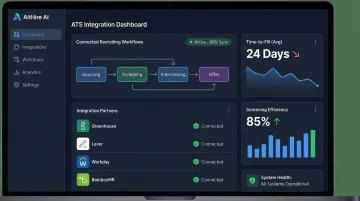
Integrating ATS platforms with HRIS creates end-to-end recruiting and onboarding automation. When a candidate's status changes to "Hired" in the ATS, the integration automatically creates the employee profile in the HRIS and triggers onboarding workflows—IT provisioning, benefits enrollment, and training assignment all happen without HR intervention.
Research shows organizations with integrated recruiting workflows achieve a 25% reduction in time-to-hire. The U.S. Department of Labor estimates a single bad hire costs at least 30% of the employee's first-year earnings, making faster, more accurate hiring decisions a direct cost-control priority.
AltHire AI supports 20+ ATS integrations—including Greenhouse, Lever, Ashby, Workable, and BambooHR—allowing AI-driven interview workflows to connect directly into the HRIS ecosystem. This reduces screening interview time by 60%, cuts recruiting costs by 50%, and improves time-to-fill by 40%.
Benefits Administration
Integrating benefits platforms with HRIS automates employee enrollment, contribution deductions, mid-year changes, and year-end reconciliation. When an employee updates a life event in the HRIS—adding a new dependent or reporting a marriage—benefits elections update automatically across connected carriers.
Key automation benefits:
- Automatic enrollment for new hires based on eligibility rules
- Real-time contribution calculations that sync to payroll
- Elimination of manual carrier file uploads (EDI files)
- Automated year-end reconciliation and reporting
During open enrollment, the impact is most visible — without integration, HR teams routinely spend 20–40 hours per week on manual processing that automated workflows handle in the background.
Compliance and Security Provisioning
Two related use cases deliver significant risk reduction:
- Compliance training: HRIS data auto-enrolls employees in role-specific courses, triggers reminders, and reports completion back to the system — no manual tracking required.
- User provisioning/de-provisioning: Employment status changes automatically grant or revoke access to email, file systems, and business applications within minutes of a termination.
According to IBM's 2025 Cost of a Data Breach report, the average cost of a malicious insider attack is $4.92 million. Automated de-provisioning cuts that exposure window from 3+ days to under an hour — a meaningful difference when access lingers after termination.
Employee Onboarding and Offboarding Automation
HRIS integration creates automated onboarding workflows the moment a new hire record is created:
- Equipment requests sent to IT automatically
- Software accounts provisioned based on role and department
- Orientation sessions scheduled and calendar invites sent
- Training courses assigned in the LMS
- Digital document signing triggered through e-signature platforms
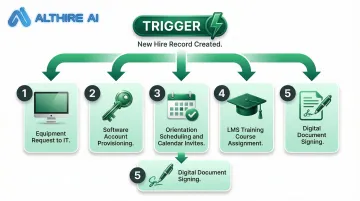
Offboarding follows the same logic — one status change cascades across every connected system simultaneously, closing accounts, revoking access, and triggering exit paperwork without manual coordination.
According to Deloitte research, HR professionals spend 57% of their time on administrative tasks. Automated onboarding and offboarding can save 1.5 to 2.5 hours per employee transition.
Time Tracking, LMS, and Collaboration Tools
Three more integrations round out a complete HRIS automation stack:
Time and attendance systems that sync hours and PTO balances in real time, eliminating manual timesheet approvals and payroll reconciliation.
Learning Management Systems (LMS) that auto-enroll employees in role-appropriate courses and report completion back to HRIS for compliance tracking.
Collaboration tools like Slack or Microsoft Teams that receive automated announcements for org changes, work anniversaries, or new hire introductions, improving employee engagement without HR intervention.
Types of HRIS Integration Methods
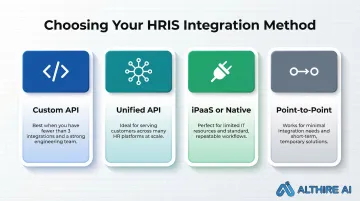
The best integration method depends on the number of integrations needed, your organization's engineering resources, budget, scalability goals, and whether the use is internal or customer-facing.
Custom API Integrations
Custom APIs offer maximum flexibility and allow precise control over data flow and triggers. You can define exactly what data syncs, when it syncs, and what actions are triggered.
Trade-offs:
- Each integration requires dedicated development work
- Partnership agreements with HR vendors (some require minimum customer thresholds)
- Ongoing maintenance as APIs evolve—Workday, for example, ships two major product releases per year with breaking changes
- Best for organizations with strong engineering teams and a limited number of critical integrations
Unified APIs
Unified APIs consolidate hundreds of HR system APIs into a single integration layer with standardized data models. This approach allows a company to connect with dozens or hundreds of HRIS providers through one technical investment.
Benefits:
- Reduced development time—build once, connect to many
- Lower maintenance burden—the unified API provider handles updates
- Standardized data models eliminate custom mapping for each platform
- Ideal for SaaS companies, recruitment platforms, or any product serving customers across many different HRIS environments
Native Integrations and iPaaS
Native integrations are partnerships between HR vendors that offer pre-built connectors. They're quick to set up but limited in number and depth—you can only integrate with the platforms your HRIS vendor has partnered with.
iPaaS platforms (Integration Platform as a Service) are low-code/no-code middleware that connects systems visually. Tools like Zapier, Workato, or MuleSoft allow non-technical users to build integrations through drag-and-drop interfaces.
iPaaS is suitable for organizations with limited IT resources but can be constrained for complex, high-volume workflows. Point-to-point integrations are direct connections built for a single specific use case. They're the least scalable option and best treated as a short-term workaround rather than a foundation.
Choosing the Right Method: A Quick Framework
If you need fewer than 3 integrations and have engineering resources → Custom API
If you're serving customers across many HR platforms → Unified API
If you have limited IT resources and standard workflows → iPaaS or native integrations
If you have minimal needs and high customization → Point-to-point as a short-term solution only
Key Benefits of HRIS Integrations and Automations
For HR Teams and Employers
Improved data accuracy: Single entry with automatic sync eliminates double-entry errors. Industry data suggests payroll error rates drop by up to 90% when systems are integrated.
Enhanced compliance: Automated audit trails and real-time updates across connected systems ensure regulatory requirements are met. Compliance training completion, I-9 verification, and benefits enrollment deadlines are tracked automatically.
Time savings: HR professionals spend approximately 9 hours per week on manual data entry tasks, according to industry research. Integration eliminates this administrative burden, freeing HR teams for strategic work.
For Employees
Improved self-service experience: Single portal access to benefits, pay stubs, time off, and performance data. Employees update information once and see changes reflected across all systems.
Faster processing of requests: PTO approvals, benefits changes, and address updates happen in real time instead of waiting for batch processing.
Real-time confirmation: Employees receive immediate feedback when changes are made, reducing uncertainty and HR ticket volume.
For Talent Acquisition
Integrated recruiting workflows produce measurable business outcomes. AltHire AI's AI-powered interview and ATS integration workflows deliver results across the full hiring pipeline:
- Reduce screening interview time by 60%
- Cut recruiting costs by 50%
- Improve time-to-fill by 40%
From candidate sourcing through employee record creation, automated handoffs replace manual steps at every stage.
Common Challenges (and How to Overcome Them)
Data Quality and Standardization
Different HRIS platforms structure data differently—field names, date formats, and employment status codes vary widely. An "active" employee in one system might be "employed" in another. Integrations must normalize data into a consistent format to avoid downstream errors.
The fix: Establish clear data standards before building integrations. Define standard field names, date formats, and status codes. Use tools that normalize data automatically, or build transformation logic into your integration layer.
Gated APIs and Partnership Complexity
Many HR platforms require formal partnership agreements, security reviews, and sometimes minimum customer counts before granting API access. This can add months to your integration timeline.
Solution: Map out required vendor partnerships early and factor negotiation timelines into integration roadmaps. Unified API solutions are worth considering for gated platforms, since they've typically pre-negotiated access with major HRIS providers.
Ongoing Maintenance and Scalability
Maintaining 3+ custom integrations means managing API versioning changes, undocumented updates, and ongoing monitoring — and that adds up fast. Maintenance can represent 70% of total cost of ownership for custom integrations.
To keep this manageable:
- Build monitoring and alerting into every integration from day one
- Set up automated tests that verify data flow after each vendor API update
- Evaluate whether the maintenance burden justifies building in-house versus buying a managed integration solution
How to Choose and Implement the Right HRIS Integration
Evaluate Before You Build
Complete a pre-integration checklist:
- Identify which workflows are highest-volume and most error-prone
- Map existing systems and data flows
- Determine internal versus external integration needs
- Assess engineering bandwidth realistically
- Define success metrics (time saved, error rate reduction, compliance improvement)
Key Selection Criteria
When evaluating HRIS integration solutions, look for:
- Pre-built connectors for your existing software stack
- Support for custom integrations when needed
- Scalability to handle data volume growth
- Security and compliance certifications (SOC 2, GDPR, HIPAA where applicable)
- Quality of developer documentation and support
- Transparent pricing that scales with your organization
Implementation Best Practices
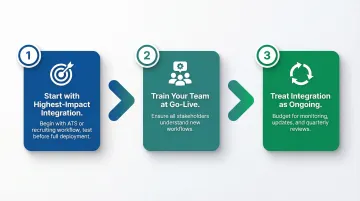
Follow these steps to reduce risk and drive faster adoption:
- Start with the highest-impact integration first — usually your recruiting workflow or ATS connection. Test in a controlled environment before full deployment, involving both HR and IT stakeholders in requirements mapping.
- Train your team at go-live — integration changes how work gets done. Make sure everyone understands the new workflows before the switch.
- Treat integration as ongoing, not a one-time project — budget for monitoring, updates, and optimization. Run quarterly reviews against the success metrics you defined upfront to catch gaps early.
Frequently Asked Questions
What is the difference between HRIS integration and HRIS automation?
Integration is the technical connection between systems that enables data exchange. Automation is the rule-based logic that triggers actions when data changes. The two work together to eliminate manual HR workflows—integration moves the data between systems, while automation decides what happens next.
What are the most important HRIS integrations for a growing company?
Payroll and talent acquisition/ATS integrations are the most critical starting points for growing teams, followed by benefits administration and compliance tools as headcount scales. These integrations deliver the highest ROI by automating the most time-consuming, error-prone processes.
Can an HRIS integrate with applicant tracking systems (ATS)?
Yes. HRIS-ATS integration is one of the most common and valuable use cases. It automates candidate-to-employee profile creation, triggers onboarding workflows on hire, and creates a smooth handoff from recruiting to HR operations—eliminating manual data re-entry and reducing time-to-hire.
What are the biggest challenges in HRIS integration?
Three challenges come up most often:
- Data standardization — different HRIS platforms use different field names and formats
- Gated API access — many vendors require partnership agreements before allowing integrations
- Maintenance overhead — APIs evolve with breaking changes, creating ongoing engineering costs
How long does it take to integrate an HRIS with other systems?
Timelines depend on the method. Native or pre-built integrations can be live in days, custom API integrations typically take weeks to months, while unified API approaches (connecting many HRIS platforms at once) can compress timelines to as little as a few days.
How does HRIS integration improve the hiring process?
ATS-HRIS integration automates the candidate-to-employee transition and triggers onboarding workflows the moment a hire is confirmed. Combined with AI-powered recruiting tools, this can reduce time-to-hire by 25-40% and cut screening costs by eliminating manual handoffs and data re-entry.