
Introduction
Recruiters spend an overwhelming amount of time on administrative tasks that keep them from the strategic, relationship-driven work that fills roles. Research shows that recruiters lose approximately 26 hours per week to repetitive tasks — 16 hours scheduling interviews and another 10 hours manually searching for candidates in their ATS.
35% of a recruiter's day is consumed by calendar coordination alone. That leaves little room for the judgment, relationship-building, and decision-making that actually move hiring forward.
Recruitment automation shifts that balance. Technology handles the routine work — resume screening, interview scheduling, status updates, data entry — so recruiters can focus on what requires human judgment. This guide covers:
- What recruitment automation is and how it works
- Which tasks it handles across the hiring process
- How to implement it step by step
- The measurable benefits it delivers
- Practical ideas you can deploy right away
Key Takeaways
- Recruitment automation uses software and AI to handle repetitive hiring tasks like resume screening, interview scheduling, and candidate communication
- The biggest gains come from high-volume, low-judgment tasks: sourcing, screening, scheduling, and status updates
- Automation removes busywork so recruiters can focus on strategic, human-centered work rather than administrative tasks
- Companies using recruitment automation report faster time-to-hire, lower cost-per-hire, and stronger candidate experience
What Is Recruitment Automation?
Recruitment automation is the use of technology—from rule-based workflows to AI-powered tools—to perform hiring tasks that would otherwise require manual recruiter effort. This spans the entire talent acquisition lifecycle, not just one stage.
Rule-Based vs. AI-Powered Automation
Knowing which type of automation you're evaluating shapes every tool decision. Here's how they compare:
| Rule-Based Automation | AI-Powered Automation | |
|---|---|---|
| How it works | Follows "if/then" logic; no reasoning | Uses ML or generative AI to predict, adapt, and interact |
| Examples | Auto-posting jobs, rejection emails, interview reminders | Adaptive screening interviews, skill inference, personalized outreach |
| Strength | Fast, consistent logistics execution | Context-aware reasoning and personalization |
| Limitation | Can't adapt to context or nuance | Requires oversight to prevent encoding bias |
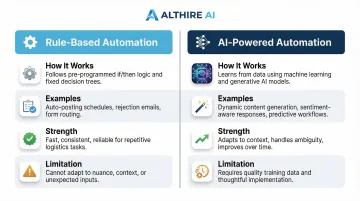
Rule-based tools handle the operational layer reliably. AI tools go further—but that extra capability comes with a responsibility to monitor outputs carefully.
Automation Enhances Recruiters, Not Replaces Them
The common misconception is that automation eliminates recruiter roles. It doesn't. Automation handles the operational layer—scheduling, screening logistics, data entry—so recruiters spend more time on the work that actually requires human judgment: building candidate trust and advising hiring managers. SHRM emphasizes that when AI informs significant employment decisions, appropriate human oversight is mandatory. 78.7% of hiring teams agree that final hiring decisions are best handled by humans.
How Automation Fits Your HR Tech Stack
Recruitment automation isn't a replacement for your existing systems—it's an enhancement. Automation tools connect to your Applicant Tracking System (ATS), HRIS, and communication platforms, creating consistent data flow across your recruitment infrastructure.
For example, when AltHire AI conducts a screening interview, the evaluation report syncs automatically into your ATS. No manual data entry, no duplicate records—just a single source of truth across your hiring workflow.
Which Recruiting Tasks Can Be Automated?
Not every recruiting task should be automated, but high-volume, repetitive tasks with clear decision criteria deliver the fastest ROI.
Job Posting and Distribution
Automation tools push a single job description to multiple job boards, social platforms, and career pages simultaneously. This eliminates manual reposting, ensures listing consistency across channels, and cuts hours of administrative work per role.
Resume Screening and Candidate Ranking
AI screening tools parse resumes, extract skills and experience, and rank applicants against role criteria in seconds. Modern AI goes beyond basic keyword matching—it identifies transferable skills and adjacent experience that traditional filters miss.
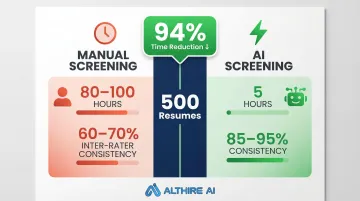
Impact: Manual resume screening typically takes 80-100 hours for 500 resumes. AI screening cuts this to 5 hours, maintaining 85-95% consistency compared to 60-70% inter-rater reliability for human reviewers. This is one of the highest-ROI automation use cases given the volume involved.
Interview Scheduling
Automated scheduling tools eliminate email back-and-forth by letting candidates self-schedule based on real-time interviewer availability. Companies using automated scheduling reduce time-to-schedule by 42% to 73%, saving an average of 10 hours weekly per role.
For teams managing high application volume, AI-powered interview platforms like AltHire AI take this further: they conduct full screening interviews autonomously, 24/7, without requiring a recruiter to be present, and generate detailed evaluation reports afterward. Recruiters then review only the most qualified candidates rather than running live phone screens with every applicant.
Candidate Communication and Nurturing
Automated email and SMS sequences handle application acknowledgment, status updates, interview reminders, and rejection notices. Consistent communication protects employer brand even at high volume. 47% of candidates withdraw from the hiring process due to poor communication and slow response times — automation closes that gap at scale.
Personalization at scale: LinkedIn reports that AI-assisted, personalized recruiter messaging generates a 44% higher candidate acceptance rate and is accepted 11% faster than generic outreach.
Reporting and Analytics
Automation tools continuously track pipeline metrics (time-to-fill, pass-through rates, source quality, funnel conversion) and surface them in real-time dashboards without requiring manual data pulls each week. That live visibility lets hiring teams spot bottlenecks early, adjust sourcing channels, and make faster decisions on open roles.
The Recruitment Automation Process: Step by Step
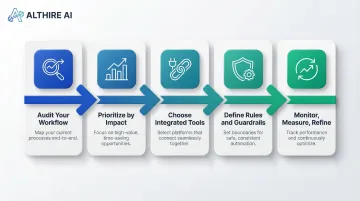
Most automation rollouts stall not from lack of tools, but from lack of sequence. Follow these five steps to build a hiring workflow that actually sticks.
Step 1 — Audit Your Current Workflow
Before choosing any tool, map out every task in your existing hiring process. Document each step from job posting through offer acceptance, identifying which tasks are:
- Repetitive and high-volume
- Prone to human error
- Time-consuming but low in strategic value
These are your automation candidates.
Step 2 — Prioritize by Impact
Rank identified tasks by time consumed and strategic value. Tasks that take the most recruiter time but require the least human judgment should be automated first — that's where you'll see the fastest ROI.
High-priority targets:
- Resume screening — high volume, rule-based criteria
- Interview scheduling — pure logistics, no judgment needed
- Status update emails — templated, repeatable communication
- Data entry and ATS updates — administrative overhead with zero strategic value
Lower-priority targets:
- Offer negotiations — require human judgment and context
- Final interviews — relationship-building moments that matter
- Hiring manager advisory — strategic consultation that needs lived experience
Step 3 — Choose Tools That Integrate With Your ATS
Integration is non-negotiable. If automation tools don't sync with your existing applicant tracking system, you create data silos and more manual work — not less.
Look for platforms with native ATS integrations (Greenhouse, Lever, Workable, BambooHR, and similar). Seamless data flow eliminates duplicate entry, reduces errors, and keeps every stakeholder working from the same source of truth.
Step 4 — Define Rules, Criteria, and Guardrails
Set the parameters that guide automated decisions: qualifying criteria for screening, communication templates, stage-trigger logic, and escalation rules.
Critical principle: Humans must define these inputs carefully, because automation will execute them consistently at scale. If your screening criteria are vague or your job descriptions poorly written, automation will surface the wrong candidates — at scale.
Step 5 — Monitor, Measure, and Refine
Getting the inputs right is only half the job. Even well-configured automation drifts over time, so regular review of outputs is essential:
- Check screening decisions for accuracy
- Review candidate feedback on the experience
- Adjust criteria as role requirements evolve
- Monitor for unintended bias in outcomes
- Track performance metrics against baseline
Regular audits ensure your automation continues delivering value and doesn't drift into patterns that undermine hiring quality.
Key Benefits of Recruitment Automation
Faster Time-to-Hire
Automation removes lag time between stages—applications are screened instantly, interviews are scheduled without delays, and feedback is collected and logged automatically.
SHRM reports a median time-to-fill of 44 days for non-executive positions. Organizations deploying AI-driven scheduling and screening report 40% to 49% reductions—one Forrester study documented a drop from 87 to 43 days.
AltHire AI customers report 70% faster time-to-hire and 60% reduction in screening interview time, demonstrating what AI-driven interview automation specifically delivers.
Reduced Cost-Per-Hire
Automation reduces dependence on contract recruiters, cuts administrative labor hours, and minimizes the compounding costs of a long hiring cycle—lost productivity, opportunity cost, and revenue drain from open roles.
The average U.S. cost-per-hire is $4,700 for standard roles. Yet organizations adopting AI automation report 20% to 40% lower costs per hire by reducing agency reliance and recruiter hours.
The true cost of slow hiring is lost revenue. Using the formula (Average Employee Revenue / 260 working days) x Time-to-fill, even modest speed gains add up fast: cutting 11 days for a company with $150,000 revenue per employee across 1,000 annual hires recovers $4.25 million.
Improved Candidate Experience
Faster responses, instant scheduling, and consistent communication make the process feel professional and respectful of candidates' time.
A smoother experience also protects employer brand—candidates who feel well-treated during hiring are more likely to accept offers and refer others.
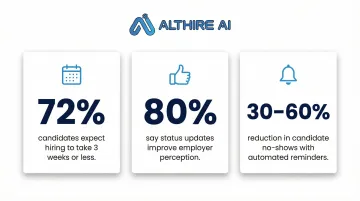
The numbers back this up:
- 72% of candidates expect the entire application process to take three weeks or less
- 80% say receiving status updates improves their experience and perception of the employer
- Automated reminders alone reduce candidate no-shows by 30% to 60%
Reduced Bias and More Consistent Evaluations
Automation applies the same screening criteria to every applicant, and structured interview tools ensure every candidate is assessed against the same rubric.
A meta-analysis on interview formats found unstructured interviews carry a bias effect size of d = 0.59; structured interviews drop that to d = 0.23. Organizations combining AI with structured human oversight achieve 73% better fairness outcomes than AI-only or human-only processes.
That said, AI can scale historical biases if left unchecked. Two cautionary examples:
- Amazon scrapped a 2015 resume screener that penalized resumes containing the word "women's" because it was trained on a decade of predominantly male hiring data
- The EEOC settled its first AI discrimination lawsuit for $365,000 with iTutorGroup, whose software automatically rejected applicants over age 55/60
Human-in-the-loop oversight is non-negotiable. Conduct annual bias audits as required by regulations like NYC Local Law 144, and evaluate AI tools for adverse impact under EEOC guidelines.
Recruitment Automation Ideas to Try Right Now
AI-Powered Screening Interviews
Instead of a live phone screen for every applicant, deploy an AI interview agent that asks role-specific questions, adapts follow-ups based on responses, and generates a structured evaluation report.
Best use cases: High-volume roles or positions attracting large applicant pools. This allows recruiters to review only the most qualified candidates rather than speaking to every applicant.
How it works: Platforms like AltHire AI conduct adaptive, conversational interviews 24/7, evaluating candidates across customizable criteria like technical proficiency, communication, and problem-solving. The AI then generates detailed reports with dimensional performance scores, question-by-question evaluation, and comprehensive proctoring details. Recruiters get everything they need to make informed decisions without conducting dozens of preliminary screens.
Automated Interview Feedback Collection
Set up automated reminders that trigger immediately after an interview concludes, prompting interviewers to complete a structured scorecard while their impressions are fresh.
Compliance benefit: Automated scorecards create an auditable record of evaluation criteria, protecting your organization in case of discrimination claims by documenting that all candidates were assessed against consistent, job-related standards.
Talent Pipeline Nurturing Sequences
Build automated email sequences that keep silver-medal candidates warm for future roles—periodic updates about company news, new openings, or culture content.
ROI: This reduces sourcing costs the next time a similar role opens because warm candidates are already engaged. Re-engaging a qualified candidate from your pipeline is far cheaper and faster than sourcing and screening candidates from scratch.
Common Mistakes to Avoid When Automating Recruitment
Automating Before Defining Clear Criteria
If the inputs are vague—poorly written job descriptions or undefined screening questions—automation will surface the wrong candidates consistently and at scale. Garbage in, garbage out.
Fix: Invest time upfront defining precise screening criteria, must-have qualifications, and evaluation rubrics before automating any decision-making process.
Over-Automating Candidate Communication
While automation handles logistics well, over-reliance on templated messages at every touchpoint makes the process feel cold and transactional.
| Automate | Keep Human |
|---|---|
| Application confirmations | Offer conversations |
| Interview reminders | Rejection calls for final-round candidates |
| Status updates | Hiring manager introductions |
| Early-stage rejection notices | Any communication requiring empathy or negotiation |
Neglecting Integration and Data Hygiene
Tools that don't connect to your ATS force duplicate data entry and introduce errors downstream. Choose tools with clean integrations and audit your data regularly to catch discrepancies before they affect hiring decisions.
Best practice: Conduct quarterly data audits to ensure candidate information, interview feedback, and pipeline metrics remain accurate across all systems.
Frequently Asked Questions
What is the difference between recruitment automation and AI recruiting?
Recruitment automation covers any technology that automates hiring tasks, from simple email triggers to complex workflows. AI recruiting is a subset, using machine learning or generative AI to make predictions and adapt behavior — such as screening tools or interview agents that adjust questions based on candidate responses.
Will recruitment automation replace recruiters?
No. Automation eliminates repetitive tasks, not recruiter roles. Recruiters shift toward higher-value work like candidate relationship building, hiring manager advisory, and final evaluation decisions that require human judgment, empathy, and strategic thinking — none of which automation can replicate.
Does recruitment automation reduce bias in hiring?
When designed correctly, yes. Applying consistent criteria at scale reduces unconscious bias in screening and variability in evaluation. That said, the criteria themselves must be carefully designed — AI trained on biased historical data will replicate those patterns.
How long does it take to implement recruitment automation tools?
Most modern platforms are up and running within hours to a few days. The main variable is team adoption, not technical setup — ATS integration typically takes a few days, and interviews can be created in under 10 minutes once the platform is configured.
What size company benefits most from recruitment automation?
While high-volume hiring teams see the most dramatic time savings, even small teams benefit. Structured workflows and consistent communication improve quality regardless of hiring volume. A startup hiring 10 people annually still gains from faster screening, better candidate experience, and reduced administrative burden.
How does recruitment automation improve the candidate experience?
Faster response times, self-scheduling, and consistent communication create a more professional experience. This directly improves offer acceptance rates and strengthens your employer brand, even among candidates who aren't selected.