Introduction
Most recruiting teams already use multiple tools — an ATS, an HRIS, interview platforms, job boards, and communication tools. But when these systems don't talk to each other, the result is data silos, repetitive manual entry, and hiring workflows that stall instead of scale.
Organizations now operate an average of 9.1 HR systems, yet only 39% report their systems are usefully integrated. And 81% with poor integration say it prevents them from achieving critical HR goals.
That inefficiency has a real cost: HR teams lose 18-22% of their time managing system issues and manual data movement rather than actual hiring. Manual data entry costs $4.86 per instance, and organizations spend an average of 14 hours per week reconciling data across disconnected systems.
This guide covers which systems matter most to connect, a step-by-step integration process, the key variables that determine whether an integration succeeds or fails, and the most common mistakes teams make when attempting to unify their recruiting stack.
Key Takeaways
- Integrating recruiting software eliminates manual data entry, reduces errors, and accelerates time-to-hire across your HR tech stack
- The highest-impact integrations connect your recruiting software to HRIS platforms, AI interview tools, scheduling tools, job boards, and communication platforms
- Success requires a tech audit, accurate data field mapping, the right integration method, and testing before go-live
- Most integrations fail due to skipped audits, poor data mapping, or overlooked compliance — rarely because of technical complexity
Which Systems Should Your Recruiting Software Connect To?
Not every integration delivers equal value — the most impactful connections are the ones that eliminate the highest-volume manual handoffs and unify the most critical hiring data across the organization.
HRIS and Payroll Platforms
Connecting your recruiting software to an HRIS ensures that when a candidate is hired, their application data, interview scores, and offer details automatically populate employee records. This eliminates duplicate entry and prevents the data inconsistency that stalls onboarding. Organizations spend an average of 14 hours per week manually reconciling HR data across disconnected systems — time that could go toward strategic talent work instead.
The financial drain extends beyond time. Each manual data entry instance carries an average cost of $4.86, and the error rate compounds quickly.
While industry benchmarks suggest a 1% duplicate record rate is achievable, most enterprises operate with 20-30% duplicate rates in their ATS and HRIS databases. Fixing a single duplicate record requires approximately eight hours of combined effort from six to eight different teams, including payroll specialists, identity management staff, and HR administrators.
AI Interview and Assessment Tools
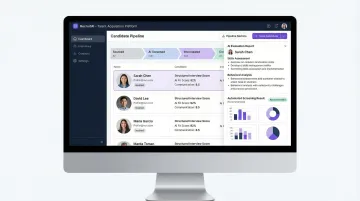
Integrating an AI-powered interview platform with your ATS centralizes structured interview data, candidate scores, and detailed evaluation reports directly on each candidate's profile — reducing recruiter effort and improving decision quality. 88% of global organizations have integrated AI into their recruitment processes, with 45% implementing AI interviewers for screening and interviewing candidates at scale.
AltHire AI is an example of an AI interview platform purpose-built for this kind of connectivity, supporting 20+ ATS integrations including Greenhouse, Lever, Ashby, Workable, and BambooHR. The platform delivers measurable outcomes like 70% faster time-to-hire by automating structured interviews with adaptive AI that adjusts questions and difficulty levels in real time. Research shows that recruiters using AI interviewers process up to 40% more candidates each week and reduce screening time by approximately 25 minutes per person, while scoring consistency is three times higher than human-only reviews.
Interview Scheduling and Communication Tools
Scheduling integrations eliminate back-and-forth coordination and auto-log confirmed interviews in the ATS — and the time savings are significant. Talent teams spend 38% of their time on scheduling alone, the highest operational burden measured, and 67% of recruiters report it takes between 30 minutes and 2 hours to schedule a single interview manually.
Communication platform integrations with Slack or Microsoft Teams push real-time candidate status updates to hiring managers without requiring them to log in separately. Automated reminders sent directly to interview panelists via these channels reduce feedback collection time to just 1.5 days on average, compared to multiple days for email-only workflows.
Job Boards and Sourcing Platforms
Job board integrations allow recruiters to publish openings across multiple platforms from one location and have all applicant data flow back automatically into the recruiting software — removing manual uploads and maintaining a single source of truth for all inbound candidates. The average company uses 12 different sources to attract quality talent, while the average candidate uses 18 different sources to search for opportunities.
Without integration, manual posting to 8-12 channels per job often takes 60-120 minutes, including form fills, copy changes, and credentials. Job ad multiposting software reduces this effort to 10-20 minutes for selection and review. For a team posting 1,000 jobs per year across an average of 6 channels, saving 40 minutes per posting returns more than 4,000 hours of capacity to the recruiting team.
Onboarding and Background Check Tools
Once an offer is accepted, the recruiting platform should hand off cleanly — not create a new queue of manual tasks. Onboarding and background check integrations close that gap by automating what happens next:
- Trigger new hire workflows automatically the moment an offer is accepted
- Initiate background checks directly within the recruiting platform, without switching tools
- Sync screening results back into the ATS, eliminating manual follow-up and status chasing
- Reduce the days-long delay that often sits between offer acceptance and first-day readiness
For high-volume hiring teams, these automations collectively cut time-to-start — the period between accepted offer and candidate start date — without adding headcount to manage the process.
How to Integrate Recruiting Software With Existing Systems
A structured integration process determines whether your team ends up with clean, reliable data flows or broken syncs, duplicated records, and compliance gaps. Most failures trace back to skipping one of the steps below.
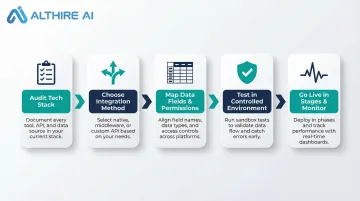
Step 1: Audit Your Current Tech Stack
List every tool currently used across recruiting, HR, and onboarding — document what data each system holds, where data is entered manually, and where the same information exists in more than one place. This audit makes it possible to prioritize integrations by their actual impact on workload and data quality.
Identify the highest-friction handoffs: which transitions between systems cause the most delays, manual effort, or data errors? Rank integration candidates by volume and business impact before building anything. Organizations using four or more HR systems experience 2.1x higher data error rates than those using one or two platforms — so knowing where consolidation or integration delivers the greatest return should drive your prioritization.
Step 2: Choose Your Integration Method
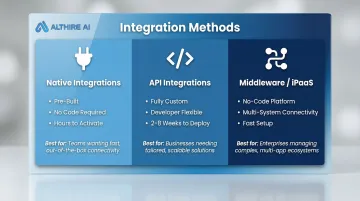
Three main methods exist for connecting recruiting software with other systems:
- Native integrations - Pre-built connectors offered by the recruiting software vendor, fastest to activate with no coding required
- API integrations - Custom connections built by developers for unique or complex data flows
- Middleware/iPaaS platforms - Tools like Zapier, Workato, or Merge.dev that connect multiple systems without custom code
How to choose: Native integrations suit standard, widely used tools and can be activated in hours or a few days. APIs are appropriate for proprietary or highly customized systems but typically require two to eight weeks depending on data mapping complexity and testing thoroughness. Middleware is ideal for non-technical teams that need to connect multiple platforms quickly without involving developers, and companies achieve a 30% increase in developer efficiency and 345% ROI over three years after adopting an integration suite.
Step 3: Map Your Data Fields and Set Permissions
Data mapping defines exactly which field in System A corresponds to which field in System B. Skipped required fields, mismatched data types, or inconsistent naming conventions are the leading cause of data corruption after integration goes live. For example, if your ATS stores "Start Date" as MM/DD/YYYY but your HRIS expects YYYY-MM-DD, the integration will fail silently or populate incorrect dates.
Permission configuration is equally important. Define which user roles in each system can read, write, or sync candidate data — this directly affects both data integrity and compliance with GDPR and CCPA. Recruiting workflows routinely handle sensitive information that requires strict role-based access controls:
- Social Security Numbers collected for background checks
- Health data gathered for accommodations requests
- Diversity metrics used for reporting and compliance
Step 4: Test in a Controlled Environment Before Going Live
Run the integration using dummy candidate records before it touches live data. Trigger each key workflow — for example, "candidate moved to offer stage" → onboarding platform activated — and verify that data lands correctly in every mapped field on the receiving system.
Document any sync errors, failed triggers, or missing fields found during testing and resolve them before activating the integration in production. Define success criteria upfront:
- Zero duplicate records created
- Interview scores auto-populated within set timeframe
- All required fields populated accurately
- Sync latency under acceptable threshold
- Failed trigger rate below 1%
Step 5: Go Live in Stages, Train Your Team, and Monitor
Activate the highest-impact integration first, communicate workflow changes to all users with brief documentation, and confirm that each automated step is performing as expected before enabling the next connection. Phased rollout reduces risk and allows you to isolate issues to a single integration rather than troubleshooting multiple simultaneous changes.
Set up monitoring for the first 30 days: track data sync errors, latency issues, and failed triggers. Create a feedback loop with recruiters and hiring managers to surface usability problems early and optimize the configuration before they become habits that are hard to break.
Even technically sound integrations fail when users don't trust them. The most common failure mode is recruiters continuing to enter data manually out of habit — creating the exact inconsistency the integration was designed to prevent.
Key Variables That Affect Integration Success
Two teams using the same tools and following the same steps can still get very different results — the outcome usually comes down to how carefully these four variables are managed throughout the process.
Integration Method Match
Choosing the wrong method either over-engineers a simple connection or under-engineers a high-volume, security-sensitive one. Evaluate fit against three factors:
- Data direction: One-way sync (for example, pushing interview scores into an ATS) works fine with a native connector
- Data volume and sensitivity: Bidirectional sync of candidate data, interview feedback, and offer details across ATS, HRIS, and background check platforms requires API or middleware
- Security requirements: High-compliance environments need solutions that support role-based access and audit logging
Data Quality at the Source
Integration amplifies whatever data quality already exists in your systems. Duplicate candidate profiles, inconsistent stage names, and empty required fields will propagate into every connected platform. Poor data quality costs organizations an average of $12.9 million per year — and that figure grows with every new system you connect.
Run a basic cleanup before activating any integration:
- Deduplicate candidate records
- Standardize field naming conventions across systems
- Fill critical missing fields that downstream platforms depend on
Security and Compliance Configuration
Recruiting data includes sensitive PII, so every integration must be evaluated against applicable data privacy regulations before activation. The global average cost of a data breach is $4.45 million, reaching $10.93 million in highly regulated sectors like healthcare.
The risk is compounded in connected environments: 82% of breaches involve data stored in cloud systems, and 39% span multiple environments. Poorly secured API connections between SaaS platforms are an increasingly common exposure point. Confirm encryption standards, access controls, and audit logging are configured before go-live.
User Adoption and Training
Even technically sound integrations fail when users don't trust them or don't understand the new workflow. Both directly determine whether the integration delivers its intended value.
Three steps that consistently improve adoption:
- Document the new workflow visually so users can see the full picture at a glance
- Clarify what syncs automatically versus what still requires manual entry
- Open a feedback channel for the first 30 days so issues surface before they become habits
Common Mistakes When Integrating Recruiting Software
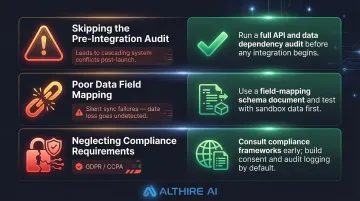
Three mistakes account for most integration failures — and all three are preventable:
Skipping the pre-integration audit. Teams that connect tools without mapping current data flows often solve the wrong problem — duplicating connections or missing the highest-impact handoffs. The audit is what lets you sequence integrations by business value, not technical ease. Connecting your ATS to a job board tool may be simpler, but if the biggest manual bottleneck is the ATS-to-HRIS handoff at point of hire, that integration should come first.
Poor data field mapping and silent sync errors. Many integrations fail quietly — data syncs but lands in the wrong fields, gets truncated, or creates duplicate records that take weeks to surface. Validate field-level mapping during testing, not after go-live. If "Candidate Phone Number" in your ATS maps to "Emergency Contact Phone" in your HRIS, the integration completes successfully but the data is unusable.
Neglecting compliance and data security requirements. Transferring candidate PII across systems without reviewing consent tracking, encryption standards, and access controls is a costly oversight. Regulators are actively targeting this: H&M received a €35.3 million GDPR fine for recording employees' private lives, Amazon France Logistique a €32 million fine for excessive employee monitoring, and Tractor Supply a $1.35 million CCPA fine for failing to notify job applicants of their privacy rights.
Conclusion
Integrating recruiting software with existing systems turns a fragmented hiring tech stack into a unified, data-driven operation. That only happens when the right systems connect in the right order, with data quality and compliance built in from the start — not patched in after the fact. Organizations that achieve this eliminate significant overhead currently spent managing system issues and manual data movement, redirecting that capacity toward strategic talent acquisition.
Most integration failures trace back to skipped preparation and poor adoption rather than technical complexity. Teams that follow a structured process, validate data mapping thoroughly, and monitor performance after go-live see faster hiring cycles, reduced administrative burden, and better candidate experiences. What separates successful integrations from costly missteps is usually process discipline — thorough mapping, phased rollout, and ongoing monitoring after launch.
Frequently Asked Questions
What are ATS integrations?
ATS integrations are software connections that allow an applicant tracking system to automatically share data with other HR and recruiting tools — such as HRIS platforms, job boards, interview software, and communication tools — eliminating manual data entry and creating a connected hiring workflow.
How do I know if my recruiting software supports integrations?
Check the vendor's integrations marketplace or API documentation — most modern platforms publish a full list of supported native integrations and offer API access for custom connections. If your tech stack is complex, confirm compatibility directly with the vendor before committing.
What is the difference between native integrations and API integrations?
Native integrations are pre-built connectors that can be activated in a few clicks with no coding, while API integrations are custom-built connections that offer greater flexibility for complex or unique data flows but require developer involvement to set up and maintain.
Do I need a developer to integrate recruiting software with existing systems?
Not always. Native integrations and middleware platforms like Zapier or Merge.dev are designed for non-technical users with no coding required. Custom API integrations are the exception — those typically need developer support for setup and ongoing maintenance.
How long does it typically take to integrate recruiting software with HR systems?
Native integrations can be activated in hours or a few days. API-based or multi-system integrations typically take two to eight weeks, depending on data mapping complexity, the number of systems involved, and testing thoroughness.
What are the biggest risks when integrating recruiting software?
The three primary risks are data corruption from mismatched field mapping, compliance violations from poorly secured PII transfers, and low user adoption. A pre-integration audit, thorough testing, and structured team training before go-live address all three.