Introduction
Inbound application volume has reshaped hiring. One job post can generate hundreds of applications overnight — LinkedIn processes over 10,000 job applications every minute, and Greenhouse customers received an average of 222 applications per job opening in Q1 2024, nearly triple the volume seen at the end of 2021.
The problem isn't just volume — it's quality. Most applications are unqualified, mass-applied, or AI-generated. In 2024, 57% of job seekers used AI to create their resumes, and 39% used AI tools to generate cover letters or assessment responses. Manual review is unsustainable at scale.
AI candidate screening addresses this directly — but it's not a plug-and-play fix. Results vary widely depending on how criteria are defined, which stage is automated, how the triage logic is configured, and whether recruiters stay in the loop. Two teams using the same tool can get dramatically different outcomes.
This guide covers exactly when AI screening makes sense, what to prepare before you start, the five steps to build a working top-of-funnel automation, the variables that shape outcomes, and the mistakes that silently derail most implementations.
Key Takeaways
- AI candidate screening automates first-pass application review using predefined criteria, AI scoring, and structured triage so recruiters spend time only on viable candidates
- The biggest impact comes from speed and consistency in the earliest funnel stage, not from replacing human judgment later
- Successful automation requires defining clear screening criteria before configuring any tool, not after
- Results hinge on three variables: criteria quality, triage bucket design, and how often screening rules are reviewed
- The approach works best for high-volume roles, remote positions, and teams where recruiters spend disproportionate time on early-stage review
Why Top-of-Funnel Screening Is Overwhelmed (and What AI Can Do About It)
One-click applications, AI-generated resumes, and wide-reach job distribution have pushed application volumes to levels most recruiting teams weren't built to handle. One-click applications typically generate 3x more submissions — but only around 40% match core job requirements. Add screening steps to that same flow, and qualification match rates can climb to 72%. More volume doesn't mean better candidates.
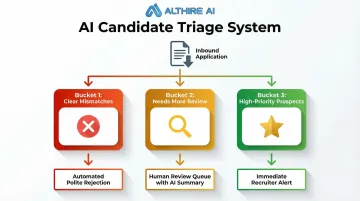
That gap is exactly what AI candidate screening is designed to close. In practice, it means using automation to review, categorize, and prioritize applications as they arrive — sorting candidates into three outcome buckets:
- Clear mismatches → automated, polite rejection
- Candidates needing more review → human review queue with AI summary
- High-priority prospects → immediate recruiter alert for fast follow-up
The best setups are transparent, configurable, and built to support — not replace — recruiter judgment. That means no opaque black-box decisions, no set-and-forget configurations, and no pretense that automation handles every edge case.
What this looks like in practice:
- Recruiters stay in control of final decisions
- AI handles volume triage, not hiring verdicts
- Configuration needs regular tuning as roles and criteria evolve
- Some scenarios still require full human review from the start
What You Need Before You Automate Candidate Screens
Preparation quality directly determines whether automation helps or harms hiring. Teams that skip this phase build workflows that filter out strong candidates or surface mismatched ones. Three areas need to be in place before any tool is configured: screening alignment, integration readiness, and compliance groundwork.
Screening Criteria and Hiring Manager Alignment
Define must-have versus nice-to-have qualifications per role — not just keywords, but:
- Role-specific competencies
- Quantifiable thresholds (years of experience, certifications, location)
- Qualitative signals that can be translated into structured questions or AI prompts
Critical: This must be co-created with hiring managers before any automation is configured. A scoring rubric validated by stakeholders prevents filtering for the wrong profile.
ATS and Tool Integration Readiness
Confirm your ATS (Greenhouse, Lever, Workable, Ashby, BambooHR) supports true two-way integration with your screening tool — not just a link embed. Candidate scores, notes, and status should flow into the system of record without manual transfer. Native integrations are faster to configure and more reliable than workarounds.
Compliance and Bias Baseline
Before going live, confirm:
- The screening tool offers transparent decision logic and audit capabilities
- Legal or HR has reviewed screening criteria for potential disparate impact on protected groups
- Automated rejections have documented rationale
Federal liability: The U.S. Equal Employment Opportunity Commission (EEOC) clarified in 2023 that employers may be held responsible under Title VII if an algorithmic decision-making tool discriminates, even if developed by an outside vendor.
The OFCCP's 2024 guidance goes further: federal contractors cannot delegate nondiscrimination obligations to third-party vendors at all.
State regulations:
- New York City (Local Law 144): Requires independent bias audit within one year, publicly posted results, and 10-day advance candidate notice
- California (CRD Automated Decision Systems): Prohibits automated systems from harming applicants based on protected characteristics; mandates four-year record retention
- Colorado (SB24-205): Requires deployers of high-risk AI to use reasonable care and conduct impact assessments (effective February 2026)
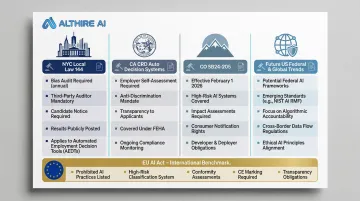
International standards: The EU AI Act (effective August 2026) classifies AI systems for recruitment as "high-risk," requiring human oversight, operational monitoring, and Data Protection Impact Assessments.
How to Automate Top-of-Funnel Candidate Screening
Each step builds on the one before it. Skipping steps — or running them out of order — is one of the most common reasons automated screening underperforms. Work through these in sequence.
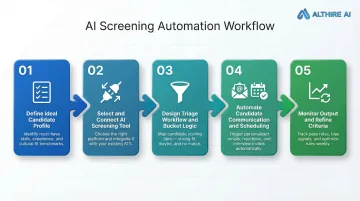
Step 1: Define Your Ideal Candidate Profile and Screening Criteria
Translate job requirements into a structured screening rubric:
- Score highly on hard requirements — specific certifications, years of experience, required licenses
- Flag soft signals for human review, such as transferable skills and motivation indicators
- Auto-disqualify on clear mismatches — geographic incompatibility, missing required credentials
This document — not the tool itself — is the intelligence layer of your automation.
Critical: Criteria should be role-specific rather than a generic company template, and must be validated with the hiring manager before configuration begins.
Step 2: Select and Connect Your AI Screening Tool
The core technology stack needed:
- A central ATS to serve as the data repository
- An AI screening or interview platform that scores candidates against your defined rubric
- A workflow connector for non-native integrations, if needed
Native ATS integrations are faster to configure and more reliable than workarounds.
Example: AltHire AI is an AI-powered interview platform built for top-of-funnel screening. It conducts adaptive, conversational AI interviews 24/7, integrates natively with 20+ ATS platforms (including Greenhouse, Lever, Ashby, Workable, BambooHR), and generates structured candidate reports. This replaces static resume-parsing with richer, skills-based signals.
Step 3: Design Your Triage Workflow and Bucket Logic
Configure the three-bucket triage system:
- Clear mismatches → automated, polite rejection
- Viable but uncertain candidates → human review queue with AI summary
- High-priority prospects → immediate recruiter alert for fast follow-up
The logic governing each bucket must reflect how recruiters actually think about candidates, not just binary pass/fail rules.
The "maybe" bucket is often the most valuable — capturing career-changers, candidates with transferable skills, or strong motivation signals that keyword rules would miss.
Step 4: Automate Candidate Communication and Scheduling
Layer communication automation on top of the triage workflow:
- Send rejection messages automatically to disqualified candidates — timely, polite, and on-brand
- Trigger interview invitations or assessment links the moment a candidate clears your threshold
- Connect with scheduling tools like Calendly to remove back-and-forth for top prospects
Automated communications should feel personal — using the candidate's name, the role title, and a clear next step. Candidates who aren't moving forward deserve a prompt, respectful close.
Step 5: Monitor Screening Output and Refine Criteria After Each Cycle
Once communication is flowing automatically, shift attention to what the data is telling you. Track downstream signals, not just time-to-first-review:
- Interview-to-offer conversion rate (healthy benchmark: 3:1)
- Hiring manager satisfaction scores
- Patterns in candidates who passed screening but failed interviews
Use this data to adjust scoring weights, update disqualifier logic, and improve bucket accuracy over time.
Criteria drift is a real risk. Review scoring weights and disqualifier logic after each hiring cycle — especially when the job market shifts or role requirements change between searches.
Key Parameters That Determine How Well AI Screening Works
Two teams using the same AI screening tool can get dramatically different results — and the gap almost always traces back to four factors.
Quality and Specificity of Screening Criteria
Vague or generic criteria produce noisy outputs. Without clear signals, AI defaults to surface-level proxies — job titles, degree prestige — that don't reliably predict performance.
Specific, role-validated criteria dramatically improve triage accuracy. Teams that invest more time upfront in defining screening criteria see fewer false positives and false negatives in their outputs.
Triage Bucket Design and Threshold Sensitivity
If the "reject" threshold is set too aggressively, strong candidates with non-linear backgrounds get auto-rejected before any human reviews them. Set it too loose and the "review" bucket becomes overwhelming — recruiters stop trusting the system entirely.
The stakes are real. Current benchmarks show:
- Only 8% of applicants advance past initial screening, and just 0.5% receive offers
- 88% of employers believe qualified candidates get screened out for not matching exact criteria (Harvard Business School, 2021)
- Recent audits found a 25-38% false negative rate across AI hiring systems
- 68% of those rejected candidates were later determined "clearly qualified" by human reviewers
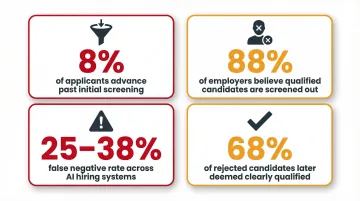
Threshold calibration directly drives these outcomes.
Adaptability of AI Questioning (Static vs. Conversational)
Traditional resume parsers evaluate static documents — they can't probe ambiguous experience or assess communication quality. A 2026 study found that deterministic keyword-based screening pipelines reject a substantial fraction of qualified candidates due to representational constraints. Semantic screening approaches, by contrast, achieved a 104% increase in recall and a 73% increase in F1-score without compromising precision.
Conversational AI tools — like AltHire AI's interview agents, which adapt follow-up questions based on each candidate's responses — surface deeper signals and reduce false confidence in resume-only screening. Adaptive questioning catches what keyword matching misses: motivation, problem-solving approach, and cultural fit indicators that produce richer data for the recruiter's review queue.
Bias Monitoring and Feedback Loop Frequency
AI models trained on historical hiring data can encode and amplify past biases. If top performers historically skewed toward certain institutions or demographics, the model may unfairly penalize candidates who don't fit that pattern.
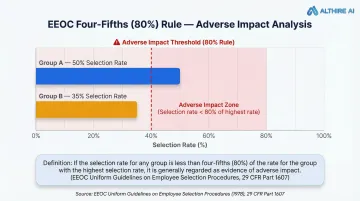
The EEOC's Uniform Guidelines on Employee Selection Procedures uses the "four-fifths rule" as a threshold for adverse impact: if the selection rate for any race, sex, or ethnic group falls below 80% of the highest-selected group's rate, that's generally treated as evidence of discrimination.
Regular bias audits — comparing screening outcomes across demographic groups — combined with easy recruiter override mechanisms are the controls that keep automated screening both fair and legally defensible.
Common Mistakes When Automating Top-of-Funnel Screens
Automating before criteria are aligned: Skipping stakeholder alignment means your workflow confidently filters for the wrong profile. Finalize the scoring rubric and validate it with hiring managers before the first candidate is processed.
Treating automated rejection as zero-risk: Mass auto-rejections without human review create legal exposure and damage employer brand — especially when the rejection logic is opaque. Audit a sample of auto-rejected candidates regularly to catch false negatives, and ensure all rejection messages are timely, respectful, and documented.
Ignoring downstream conversion signals: Most teams measure screening success by volume processed per hour, not by whether screened-in candidates actually advanced or performed. Effective automation tracks both speed and signal quality — including performance appraisal scores, ramp-up time, and first-year retention.
Frequently Asked Questions
What is an automated screening system?
An automated screening system uses AI, predefined criteria, and workflow rules to review inbound applications the moment they arrive — categorizing candidates into priority, review, or rejection buckets without requiring a recruiter to manually read every resume.
What is an example of an automated workflow?
A candidate submits an application → the ATS triggers the screening tool → AI evaluates the resume and written responses against role criteria → the candidate is bucketed as high-priority, review, or rejected → an automated email is sent and the recruiter's queue is updated.
How is AI candidate screening different from ATS keyword filters?
ATS filters apply rigid keyword rules — and a 2025 survey found they reject up to 88% of qualified candidates due to formatting or synonym mismatches. AI screening evaluates multiple signals in context, recognizing transferable skills, assessing response quality, and weighting factors by importance rather than presence or absence alone.
Will AI screening accidentally reject qualified candidates?
Poorly configured screening can produce false negatives — especially for career-changers or non-traditional backgrounds. A "maybe" review bucket, regular audits of auto-rejected candidates, and recruiter override capabilities are essential safeguards in any well-configured system.
When does it make sense to automate top-of-funnel candidate screening?
Automation delivers the clearest ROI when roles generate high inbound volume, recruiters are spending excessive time on early-stage review, or application quality is inconsistent. Remote and high-visibility roles are typically the best starting points for piloting.